

Working with URLs (Pro)
URL Locations are the functional replacement for the legacy Endpoints model. They store the same URL-shaped fields you are used to — protocol, host, port, path, query, fragment — and serve the same role: identifying where a web-application Finding lives.
This page covers what changes when you start using URL Locations day-to-day, the new UI surfaces, and the API endpoints to use in place of the legacy Endpoint API.
The URL Subtype
Every URL is a Location. That means a URL has both:
- The structured URL fields (
protocol,user_info,host,port,path,query,fragment, plus ahashused for de-duplication). - The shared Location fields (
location_type="url", a canonicallocation_valuestring for display and search, tags, inherited tags, metadata, and Reference links to Assets and Findings).
When you create or upload a URL, DefectDojo parses it into the structured fields and writes both the URL row and its parent Location row in a single transaction. URL de-duplication is exact-match across the structured fields — two URLs are considered the same if every component matches, with the standard default-port collapsing (http://example.com:80/ and http://example.com/ resolve to the same URL).
In the Pro UI
When the Locations feature is enabled, the navigation exposes:
- Act > Explore > Attack Surface > Locations — A list of every Location across both URL and Dependency subtypes. Filter by type, status, Asset, Finding, or tag.
- Act > Explore > Attack Surface > URLs — A scoped list of URL Locations only. This is the closest analogue to the old Endpoints page.
- New URL on the URLs list — A form to create a single URL with structured fields, tags, and optional Asset/Finding associations.
- Locations on an Asset — From any Asset, the Locations tab shows the URLs and Dependencies attached to that Asset, with status counts and quick actions.
- The Location page — Click a Location’s value in any list, or choose View Location from its row menu, to open the page for that Location. It is the counterpart of the old Endpoint page: the Location’s type, value, tags and overall status; when it was first and last seen; each Asset that references it, in a table you can search, sort and filter by Asset, status, relationship, and first or last seen date; its Custom Fields; and every Finding found there.
- Custom Fields on a Location — The name and value pairs the Endpoint page called metadata appear in the same Custom Fields card the Endpoint page uses. A Location is shared by every Asset that recorded the same value, so a field can belong to one Asset. The card shows the Asset under each value, adds the Asset to a tab’s name when two Assets use the same field name, and only shows fields for Assets you can view. Add a field with the + on the card or Add Custom Field in the Location’s menu, and choose the Asset it belongs to, or none. Edit or delete a field from its gear menu. Changing a field needs edit permission on the Location, and on its Asset when the field belongs to one.
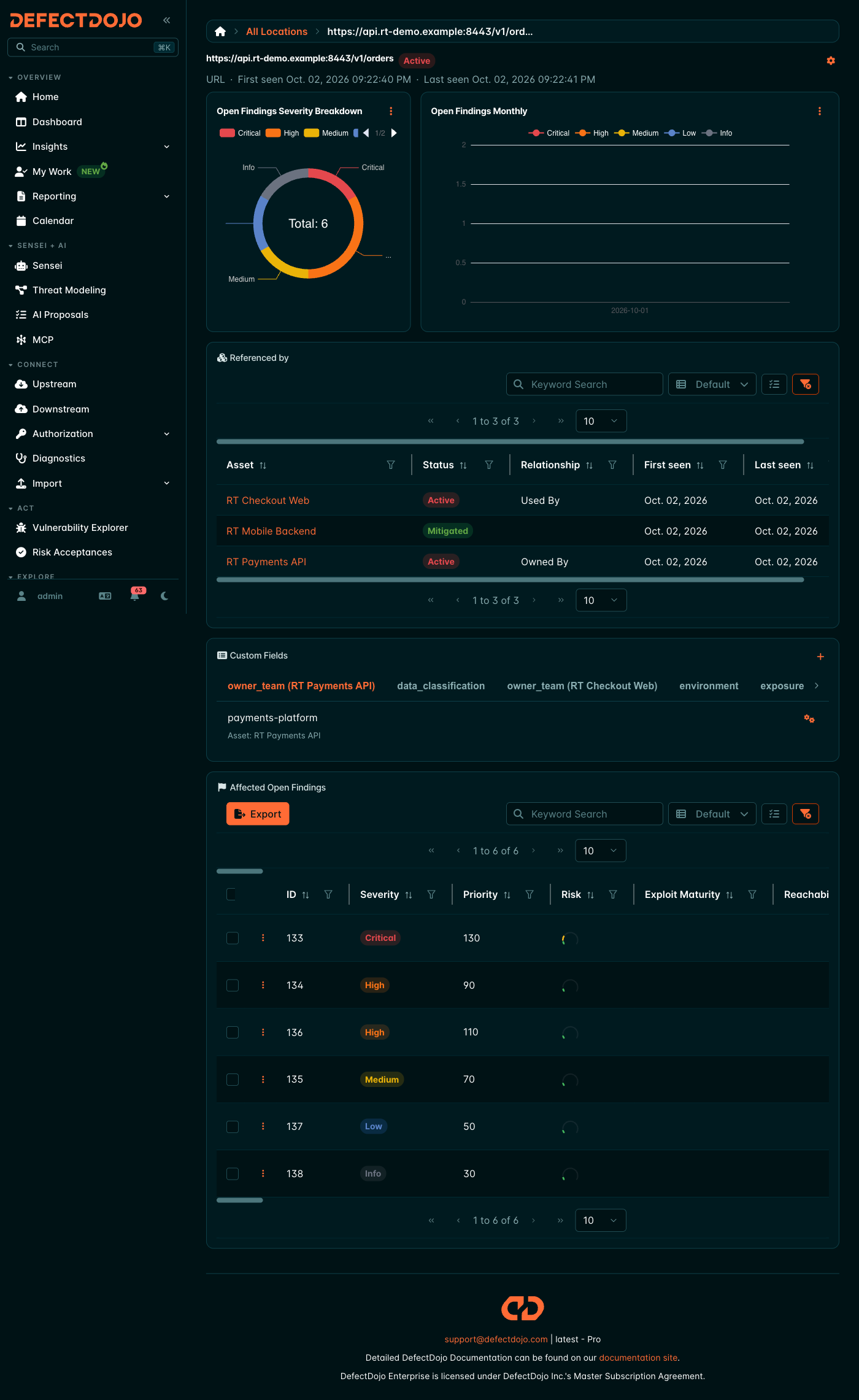
Common workflows from the Endpoints UI are preserved:
- Bulk status updates. Select multiple URL Locations and apply a status (Active, Mitigated, False Positive, Risk Accepted, Out of Scope) to their Finding references in one action.
- Adding existing URLs to an Asset. Use Add Existing on an Asset’s Locations tab to link URLs already in the system rather than creating duplicates. Add Existing needs edit permission on that Asset (on a Finding’s Locations, permission to edit Findings on the Finding’s Asset), because it only links a Location you can already see. New Location creates one on that Asset or Finding, so it needs permission to add Locations on the Asset. Both follow your role on the Asset you are looking at (or its Organization), not a role you hold somewhere else. On All Locations, which creates a Location with no Asset, New Location needs a global role that can add Locations. New URL (on All URLs and an Asset’s URLs) and New Dependency also create one with no Asset, so they need the same global role.
- Tags. Tags applied to a URL Location propagate as inherited tags on the Findings that reference it, the same way Endpoint tags previously did.
Status Model
URL Locations use the same single-status labels as all other Locations:
| Status | Meaning |
|---|---|
| Active | The Finding at this URL is open. |
| Mitigated | The Finding has been remediated for this URL. |
| False Positive | The Finding is not a real vulnerability for this URL. |
| Risk Accepted | The Finding is acknowledged but accepted at this URL. |
| Out of Scope | This URL is excluded from the engagement. |
Note that the old Endpoint Status model allowed multiple flags simultaneously (e.g. mitigated=True and false_positive=True). Locations enforce one status at a time. If you migrated from Endpoints, the most specific flag was preserved (see the mapping table in Migrating from Endpoints).
Asset References use a simpler status: only Active or Mitigated, since Asset-level status does not need the auditing detail.
REST API
Use these endpoints in place of the legacy Endpoint API:
| Task | Endpoint |
|---|---|
| List URLs | GET /api/v2/urls/ |
| Create a URL | POST /api/v2/urls/ |
| Update a URL’s tags or metadata | PATCH /api/v2/urls/{id}/ |
| List all Locations (URLs + Dependencies) | GET /api/v2/location/?location_type=url |
| Link a URL to a Finding | POST /api/v2/location_findings/ |
| Link a URL to an Asset | POST /api/v2/location_products/ |
| Update a Finding-link’s status | PATCH /api/v2/location_findings/{id}/ |
| Remove a Finding-link | DELETE /api/v2/location_findings/{id}/ |
Filters on /api/v2/urls/ include the structured URL fields plus tag(s), has_tags, Asset, and ordering by host, Asset, or active-finding count.
The legacy /api/v2/endpoints/ endpoint still serves read traffic via a compatibility shim — see Migrating from Endpoints for what is preserved and where the shim differs from the original behaviour. Writes to the legacy endpoints return 403 and must be moved to the endpoints above.
Importing URLs from Scans
Scanner imports create URL Locations automatically. When a parser emits a URL for a Finding (the same way it used to emit an Endpoint), the importer:
- Looks up an existing URL with matching structured fields, or creates one.
- Creates a Finding Reference linking the Finding to the URL with status Active.
- Creates (or reuses) an Asset Reference so the URL also appears on the parent Asset.
DefectDojo parsers which previously created Endpoints have been updated to automatically create Locations in Pro.
Things That Behave Differently
A few small behaviour changes are worth noting:
- One status per URL/Finding pair. As described above, the multi-flag Endpoint_Status model is collapsed to a single status. Workflows that toggled flags independently need to pick a single transition.
- Tags live on the Location, not the URL. The URL subtype does not carry its own tag set; tags belong to the parent Location. If you read a URL via the API, the
tagsfield comes fromlocation.tags. - De-duplication is per-canonical-URL, not per-Asset. Two Assets that have the same URL share a single underlying URL Location and reference it twice (one Asset Reference each). This is intentional and is what enables cross-Asset reporting.
- The
endpointsfield on Findings. When the flag is on, this field on the Finding API still returns rows, but they are projected from URL Locations rather than from the Endpoint table. Treat it as read-only and write through/api/v2/location_findings/instead.