

Feature comparison
DefectDojo comes in two editions, built on the same data model and the same parsers.
DefectDojo Open-Source is a free, self-hosted vulnerability management platform. It imports results from hundreds of security tools, deduplicates them, tracks every Finding through triage and remediation, and reports on the result. It suits teams that want to run and extend the platform themselves.
DefectDojo Pro is built on the same core for programs that need to run at scale: connectors that pull findings in and push work out, prioritization by exploitability and business context, a Triage Engine that automates routine decisions, saved and scheduled reporting, AI assistance, compliance evidence, enterprise sign-on, and commercial support. It is available cloud-hosted or self-hosted.
This page was last checked against release 3.4.101 (October 2026).
What you see after logging in
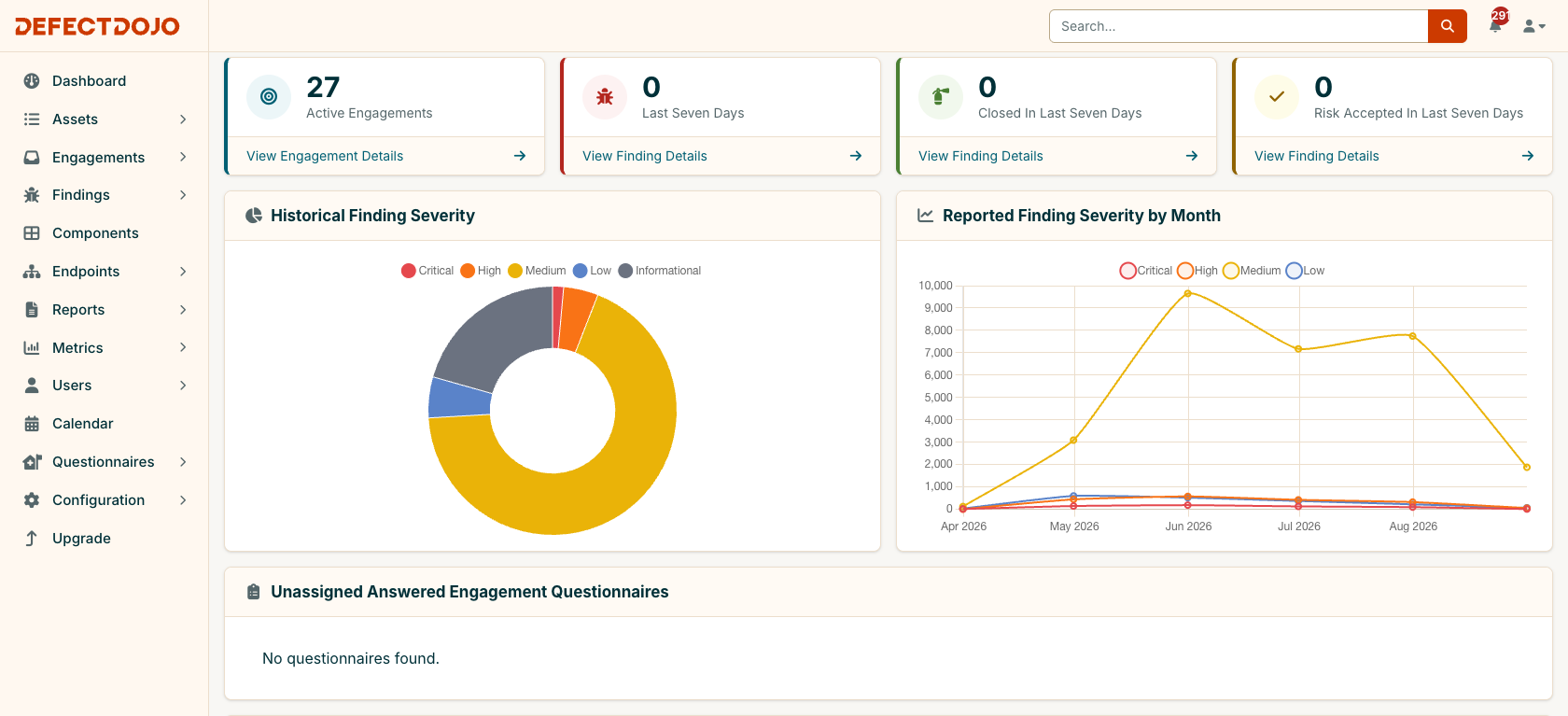
Open-Source: the Dashboard. Counts for the last seven days, Findings by severity, and a monthly trend.
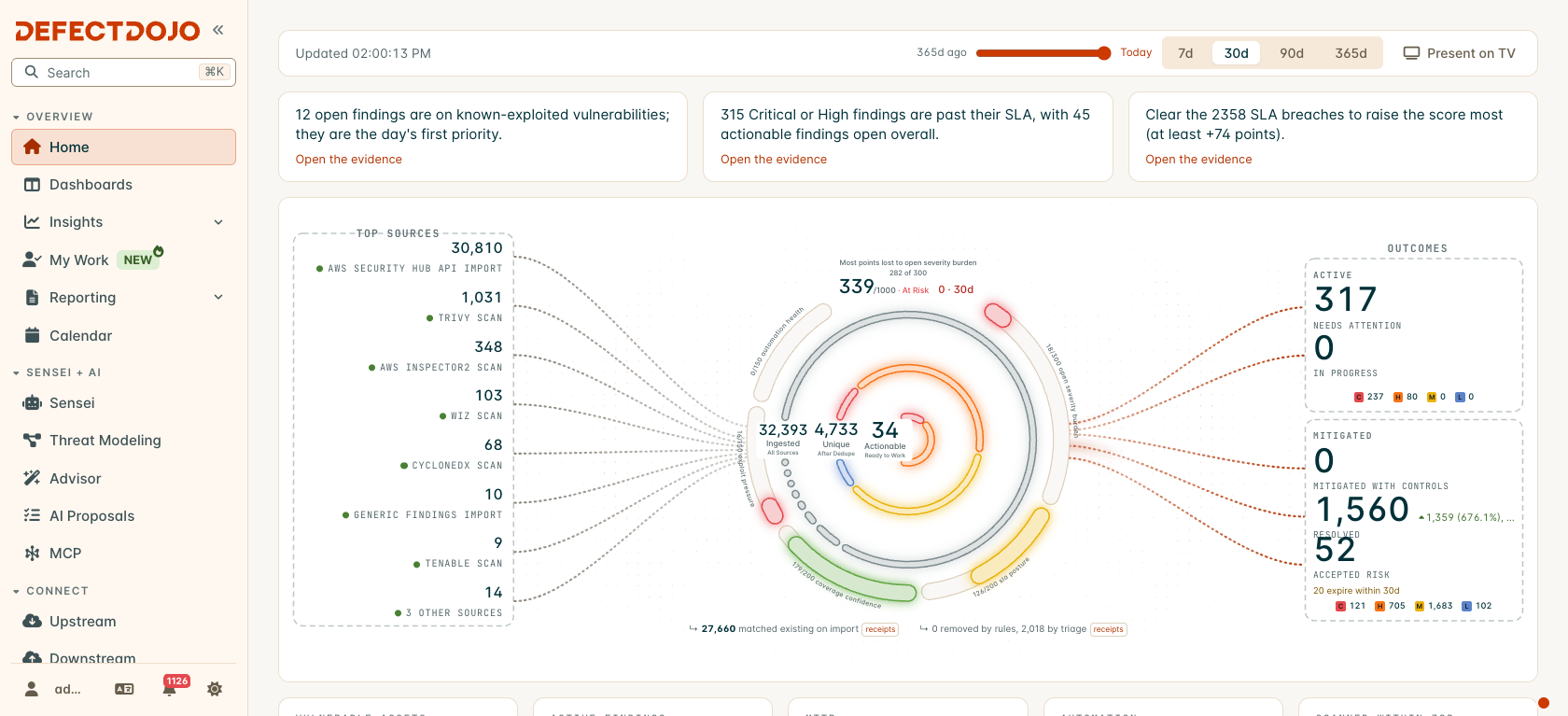
Pro: the Command Center. It shows where your Findings come from, how many survive deduplication and triage, your Posture Score, and what is waiting for action. A short daily brief at the top links straight to the evidence, and every number opens the list behind it.
How the editions compare
Each table below covers one part of a vulnerability management program. The value to users describes what the capability gives your team, whichever edition provides it. ✅ means the edition provides the capability, ❌ means it does not, and an entry with no mark describes the closest thing that edition offers.
Getting findings in
| Capability | Open-Source | Pro | The value to users |
|---|---|---|---|
| Scanner support | ✅ 360+ built-in parsers for SAST, DAST, SCA, container, cloud and infrastructure tools | ✅ Every open-source parser, plus the Universal Parser, which lets you map any CSV, JSON or XML report that has no built-in parser | Every tool’s results in one place, so nobody has to log in to a separate console for each scanner. |
| Importing scan files | ✅ Upload scan files in the UI, or send them through the API or a CI pipeline. Reimporting a newer scan closes findings the scanner no longer reports | ✅ The same, plus imports that run fully in the background, and the Universal Importer and DefectDojo CLI for pipelines | Each finding keeps its history from scan to scan: fixes close themselves, and anything that comes back reopens, without manual bookkeeping. |
| Pulling results from a scanner’s API automatically | ❌ Not included. Open-Source cannot connect to another tool’s API to fetch its results; each scan has to be exported from the tool and sent to DefectDojo, by hand or with a script you maintain | ✅ 140+ Upstream Connectors connect to the APIs of scanners, cloud platforms and code hosts, and pull in their findings and assets on a schedule | Results arrive on their own, with no export-and-upload scripts to build or maintain, and new assets in a connected tool show up without anyone creating them. |
| Infrastructure scans | Each scan file is imported into one Asset you choose | ✅ Smart Upload automatically assigns the findings in an infrastructure scan to the right Asset for each host. Anything it cannot match is held for a person to assign | One Tenable or Qualys scan covering hundreds of hosts lands on the right Assets, with no manual splitting. |
| Connector health | ❌ Not included | ✅ A Diagnostics page shows, in one place, every failure from connectors, ticket syncing, single sign-on, imports and rules | You spot a broken integration on one page the day it breaks, instead of noticing missing data weeks later. |
Normalization, deduplication and enrichment
| Capability | Open-Source | Pro | The value to users |
|---|---|---|---|
| Normalization | ✅ Every parser converts its tool’s report into the same Finding format, combining or splitting the tool’s fields as needed (severity, CWE, CVE, component, file and line, location) | ✅ The same normalization | Every scanner reports in its own format, and the same piece of information can be one field in one tool and three in another. Normalization turns all those different reports into one consistent format, so a finding looks the same whichever tool found it, and you can filter, compare and report across all your tools at once. |
| Deduplication | ✅ Same-tool deduplication: when a scanner reports a finding it has already reported, the new copy is marked as a duplicate. The matching rules are set in configuration files or environment variables, not in the UI | ✅ Several matching algorithms, chosen per tool in the UI under Matching Configuration, including cross-tool deduplication, so the same issue reported by different scanners is worked once. Dedupe Pools let a group of Assets deduplicate against each other | You can stack several scanners that do the same type of scan against the same repository, container or host, and still see one consolidated list of findings, with the duplicates between tools removed. |
| Exploit intelligence | EPSS, KEV and ransomware fields exist on each finding, but they are only filled in when the scanner itself reports them. DefectDojo does not look them up | ✅ EPSS scores, the CISA KEV catalog (including known ransomware use) and exploit-maturity data are looked up for every finding with a CVE and updated automatically every 24 hours, whatever tool found it. Air-gapped installs load them from a file | You can see which of your findings attackers are actually exploiting today, and fix those first. |
| Root causes | ❌ Not included. The closest feature is Finding Groups, which bundle findings from a single Test (by component, file path, title or vulnerability ID) so they can be pushed to Jira as one issue | ✅ Root Causes finds the findings, across every Asset, that one fix would clear (the same component version, CVE, cloud resource or container image) and ranks each cause by how many findings and Assets it affects | Your engineers get one work item per fix, such as one library upgrade, that clears every finding it causes across the whole organization. |
| Vulnerability view | ❌ Not included | ✅ Vulnerability Explorer shows each CVE (or other vulnerability ID) once, with every Asset it affects | When a new vulnerability is in the news, you can answer “where are we exposed?” in minutes. |
Prioritization
| Capability | Open-Source | Pro | The value to users |
|---|---|---|---|
| Ordering the work | Findings are ordered by severity and CVSS. Business attributes (criticality, internet exposure, revenue, user records) can be recorded on each Asset, but they do not change the order | ✅ Every finding gets a priority score and a risk band (Urgent, Needs Action, Medium, Low). The score weighs severity, EPSS, KEV, threat intelligence, reachability, how widespread the root cause is, and the Asset’s business attributes. The weights are customizable, and each Asset can use its own Prioritization Engine, so a customer-facing app and an internal test system can be prioritized differently | Your team works on the findings most likely to be exploited and most damaging to the business first, instead of an endless list of “criticals”. |
| Reachability and exposure | ❌ Not included | ✅ Shows whether vulnerable code is actually called and whether a host can be reached from the internet, using what scanners and connectors report and an optional connection check. Each verdict shows where it came from | Findings in code that never runs, or on hosts nothing can reach, stop crowding out the ones that matter. |
Triage and automation
| Capability | Open-Source | Pro | The value to users |
|---|---|---|---|
| Automated Triage Rules Engine | ❌ Not included | ✅ The Triage Engine is a no-code rules engine. A rule runs when something happens, such as a scan being imported or a finding changing, and then acts: it can update findings, assign owners, accept risk, open tickets, send messages or generate reports. See The Triage Engine below | The routine decisions your analysts make by hand every day are made automatically and the same way every time, and every change can be traced back to the rule that made it. |
| AI-assisted triage | ❌ Not included | ✅ Rules can ask AI to review findings: is this likely a false positive, is it actually exploitable here, and which findings share the same fix. The AI only suggests; each suggestion waits in AI Proposals until a person accepts or rejects it (Sensei license) | Analysts spend less time on “is this real?” questions, and a person still makes every final call. |
| Missing-scan detection | ❌ Not included | ✅ Scan Cadence sets how often each Asset must be scanned (by Organization, regulation, criticality or Asset) and flags Assets that are due, overdue or have never been scanned. A rule can alert you when an expected scan does not arrive | You learn that a pipeline stopped scanning before an auditor does. |
Remediation and ticketing
| Capability | Open-Source | Pro | The value to users |
|---|---|---|---|
| My Work page | You can ask other users to review a finding | ✅ Owners and named assignees on findings and risk acceptances, reviews that a team member can claim, and My Work, each person’s own list of assignments, reviews, risk acceptances and AI proposals | Everyone opens DefectDojo to a list of exactly what is theirs to do, and nothing waits on a review nobody picked up. |
| Remediation planning | ❌ Not included | ✅ The Remediation Center turns open findings into a list of concrete fixes (upgrade this package, apply this patch, change this setting), each due by the earliest SLA among the findings it clears. Campaigns track one fix across every place it is needed | Engineers get a short list of changes with deadlines instead of thousands of findings. |
| Ticketing | ✅ Jira, with status kept in sync both ways (including Finding Groups and Engagement epics), and GitHub Issues | ✅ Jira, plus Downstream Connectors for Azure DevOps, GitHub, GitLab Boards, Bitbucket, Linear, Shortcut, ServiceNow (ITSM and SecOps Vulnerability Response), Zendesk, ServiceDesk Plus, Freshservice, PagerDuty and Opsgenie | Work reaches engineers in the tracker they already use, and status flows back without double entry. |
| Notifications | ✅ Email, Slack, Microsoft Teams, webhooks and in-app alerts | ✅ Everything in open-source, plus notifications that are automated with the Triage Engine: a rule decides who hears about which findings, and sends the message to Slack, Microsoft Teams, email or Amazon SNS | The right people hear about the findings that need them, when they need to, without someone watching the queue. |
Risk acceptance and SLAs
| Capability | Open-Source | Pro | The value to users |
|---|---|---|---|
| Risk acceptance | ✅ Accept risk on findings in an Asset, recording the decision (accept, mitigate with compensating controls, fix, avoid or transfer), an owner, supporting proof, an expiry date, and what happens to the findings when it expires | ✅ Everything in open-source, plus a built-in risk acceptance workflow with approvals: one Risk Acceptances page for the whole instance, a person with approval rights must approve each acceptance, nobody can approve their own, and an expired acceptance needs a new approval to be extended. Acceptances can also cover new findings that match the same criteria automatically | Every accepted risk is a reviewed, approved decision with a history you can show an auditor. |
| SLAs | ✅ SLA configurations per Asset: a number of days to fix each severity, with an option to restart the clock when a finding reopens | ✅ SLAs by severity or by risk, a choice of when the clock starts (when the finding is detected, when the vulnerability is published, or when a fix is available), deadlines that never exceed the CISA KEV due date, FedRAMP response deadlines, and SLAs assigned automatically by business criticality | Your deadlines match the rules your regulators and customers actually hold you to. |
Dashboards and reporting
| Capability | Open-Source | Pro | The value to users |
|---|---|---|---|
| Dashboards | ✅ One fixed Dashboard | ✅ The Command Center, with a Posture Score from 0 to 1000 that you can click through to the findings that lower it, and customizable dashboards that start from ready-made templates (executive brief, priority, triage, mitigation, tool coverage and more), can be shared, set as a team default or shown on a wall screen, and can send a scheduled executive pack as a PDF | Leaders get one number they can follow back to the findings behind it, delivered to their inbox, and each team gets a view built for its job without starting from scratch. |
| Metrics | ✅ Metrics pages by Organization, Asset and engineer, and for critical Assets | ✅ Five Insights views (Executive, Priority, Program, Remediation, Tool), each exportable to PDF | Ready answers to “how exposed are we?”, “what first?”, “is the program working?”, “are we fixing on time?” and “which tools earn their keep?” |
| Reports | ✅ A report builder and one-click reports in HTML, generated each time you need them and not saved; findings can be exported to CSV and Excel | ✅ Saved report templates, built from reusable blocks and styled with your own branding (themes). Templates can be rerun at any time, scheduled, or generated by a rule, in PDF, HTML, CSV, Excel or JSON. See Reporting below | You build the monthly report once, and it arrives on schedule after that, instead of being rebuilt by hand every month. |
AI
| Capability | Open-Source | Pro | The value to users |
|---|---|---|---|
| MCP server | ❌ Not included | ✅ A built-in MCP server lets AI assistants (Claude, OpenAI and Gemini clients, for example) read your DefectDojo data, and do work in it, with each user’s own permissions. See The MCP server below | Analysts can ask questions of their findings, and build reports and dashboards, from the AI assistant they already use. |
| Sensei | ❌ Not included | ✅ Sensei scans code repositories (GitHub, GitLab, Bitbucket, Azure DevOps) and cloud accounts (AWS, Azure, GCP) and opens pull requests that fix what it finds (Sensei license) | Findings turn into ready-to-review fixes, not just tickets. |
| Threat modeling | ❌ Not included | ✅ Threat Modeling reads a design document or architecture diagram and lists the likely threats (using STRIDE), attack paths and security requirements, which can be added to DefectDojo as findings (Sensei license) | Design flaws are caught and tracked before there is code to scan. |
| Configuration advice | ❌ Not included | ✅ Sensei Advisor suggests changes to your deduplication and prioritization settings and shows how each would affect your own findings. Nothing changes until someone applies it, and applied changes can be undone (Sensei license) | Tuning is based on what your own data shows, not guesswork, and it is safe to try. |
| AI inventory | ❌ Not included | ✅ AI Inventory lists the AI coding assistants, MCP servers, models and AI packages found in your code repositories. AI Governance Policies create a finding whenever an unapproved one turns up | You can see, and govern, the AI your developers are actually using. |
Sensei is never trained on your data, and DefectDojo’s AI provider does not train on it either. On DefectDojo Cloud, Sensei is an AI agent built by DefectDojo. It runs inside your dedicated DefectDojo instance and reaches its models within DefectDojo’s Google Cloud environment, using credentials unique to your instance, and your data is never mixed with another customer’s. On self-hosted Pro, Sensei is the agent harness and you bring the model: connect the provider you already use (Anthropic, OpenAI, Amazon Bedrock or Google Vertex AI) under AI Model Settings, and model traffic goes directly from your instance to your own provider account. Cloud customers who want the same can bring their own model as an enterprise option: contact hello@defectdojo.com.
Compliance and product security
| Capability | Open-Source | Pro | The value to users |
|---|---|---|---|
| Compliance evidence | Regulations can be recorded on an Asset as labels, with no controls or evidence behind them | ✅ Compliance links your findings to the controls of nine bundled frameworks, generates FedRAMP POA&Ms and OSCAL documents, scores CMMC, and collects evidence for PCI DSS and EU regulations. See Compliance below | Audit evidence is generated from your live findings, instead of being maintained by hand in spreadsheets. |
| EU CRA reporting | ❌ Not included | ✅ Prepares the reports the EU Cyber Resilience Act (Article 14) requires for an actively exploited vulnerability, and tracks the 24-hour, 72-hour and final-report deadlines from the moment you become aware of it | You meet the statutory deadlines on a clock that cannot quietly be paused. |
| PSIRT | ❌ Not included | ✅ The PSIRT Advisory Engine, for teams that ship software products: it checks incoming security advisories against the components listed in your products’ SBOMs, tracks each case against an SLA, and publishes your own advisories in the standard CSAF and VEX formats (PSIRT license) | Product security teams answer “are our products affected?” and publish the answer from one system. |
| SBOM and VEX export | ❌ Not included | ✅ Exports a software bill of materials (CycloneDX or SPDX), and a CycloneDX VEX document that states which vulnerabilities affect you, from your findings | You can hand customers and regulators your component and exploitability statements in the standard formats they ask for. |
Assets and inventory
| Capability | Open-Source | Pro | The value to users |
|---|---|---|---|
| Asset model | ✅ Organization → Asset → Engagement → Test → Finding | ✅ Everything in open-source, plus parent and child Assets (an Asset Hierarchy), Assets that can belong to more than one Organization (once shared membership is switched on), and Change Plans that restructure many Assets at once, with a preview first and an undo afterwards | DefectDojo matches how your organization is really built, and you can reorganize it safely as that changes. |
| Locations (where a finding lives) | Endpoints (the URLs and hosts a finding affects) and Components (the package name and version recorded on each finding, one per finding) | ✅ Locations: URLs, dependencies, source code, cloud resources and container images, each a record of its own with a many-to-many link to every Asset and finding it relates to | Every finding is tied to the thing that has to change, and you can see everything affecting one package, image or cloud resource across all your Assets. |
| Custom data | ✅ Free-form key-value metadata | ✅ Custom fields with a defined type (such as number, date or a choice list) on Findings, Assets, Organizations, Engagements, Tests and risk acceptances, and control over which fields each form shows or requires | Records hold the data your process needs, in a form reports and rules can use. |
Access, administration and support
| Capability | Open-Source | Pro | The value to users |
|---|---|---|---|
| Sign-in | Local accounts with a password policy only | ✅ Single sign-on (SAML, OpenID Connect, Google, Microsoft Entra ID, Okta, Keycloak, Auth0, GitLab, GitHub Enterprise), LDAP, automatic user provisioning with SCIM, and multi-factor authentication | Single sign-on and multi-factor authentication are enterprise-grade requirements: people sign in with the identity provider your organization already uses, and joiners and leavers are handled in one place. |
| Access control | Superusers manage everything; other users see only the Organizations and Assets they are added to | ✅ Built-in roles, user groups and global roles, plus fine-grained custom roles where you choose exactly which actions each role may perform | Each person gets the access their job needs and no more. |
| Feature control | ✅ System Settings switches built-in features such as Jira, GitHub, deduplication, SLAs, Finding Groups and each notification channel on or off | ✅ Everything in open-source, plus a Feature Flags page where an administrator chooses which Pro features are turned on for the instance | You roll out new capabilities when your team is ready for them, without a redeploy. |
| Audit | ✅ A change history on each record | ✅ Instance-wide Audit Logs of who changed what and when, and a Usage Log of import, reimport and bulk-delete activity | One record of every change to show an auditor. |
| User interface | ✅ A server-rendered web UI in 28 languages | ✅ The Pro UI: global search, saved table layouts, a filter bar, grid and list views, customizable record pages, guided walkthroughs, and light and dark themes | Teams working through large volumes of findings spend less time navigating. |
| API | ✅ REST API v2 with OpenAPI documentation, and API v3 (alpha) | ✅ Everything in open-source, plus API endpoints for Pro features | Anything you do in the UI can be automated. |
| Hosting | ✅ Self-hosted (Docker Compose or Helm) | ✅ Cloud-hosted by DefectDojo, self-hosted, or air-gapped | Run it where your data rules require. |
| Support | Community support on GitHub and Slack | ✅ Commercial support for cloud-hosted, self-hosted and air-gapped deployments, a dedicated customer success manager, and feature requests that are prioritized and guaranteed a review. Support requests, including requests for a connector to any tool you want supported, can be raised and tracked from inside the product | Help when you need it from the people who build the product, and a direct say in what gets built next. |
Some Pro capabilities need an add-on license; they are marked with the license name.
A closer look at specific Pro features
The Triage Engine
The Triage Engine is Pro’s automated rules engine. You build each rule in a visual editor, with no code: it starts from a trigger (something that happened) and runs a chain of steps (what to do about it).
- Triggers: a scan landing (or a group of scans), a Finding or Asset being created or changed, an inbound webhook from another system, an expected scan that has not arrived, a schedule, or a manual run.
- Steps that change findings: set severity, status, priority or any field, add tags or notes, assign owners and reviewers, accept risk, or attach a mitigation policy.
- Steps that change Assets: set fields, move to an Organization or parent, assign an SLA or a Dedupe Pool.
- Steps that reach other systems: open a Jira or downstream ticket, sync a ticket’s status back, send to Slack, Teams, email, SNS or a webhook, raise an in-app alert, or generate a report.
- AI steps (Sensei license): ask AI whether a finding is likely a false positive, whether it is actually exploitable, and which findings share the same fix. The answers are suggestions that wait in AI Proposals for a person to accept.
New rules start in Simulate mode, which shows what a rule would do to your real findings without changing anything. Every live run records which findings and Assets each step changed, and every outbound message can be replayed from Deliveries.
Reporting
| Open-Source | Pro | |
|---|---|---|
| Building a report | Choose widgets (cover page, table of contents, text, finding list, endpoint list) and generate | Assemble a template from saved blocks: tables and detail views over any record type with their own filters, 17 charts that use the same calculations as Insights, any dashboard widget, and cover, contents, text and image blocks |
| Saving and reuse | The report is built each time; nothing is saved | Templates, blocks and themes are saved and shared across the instance; template variables let one template serve any Asset or Finding |
| Branding | Fixed | Themes: colours, fonts, header and footer images, footer text and page numbers |
| Formats | HTML (CSV and Excel exports of findings) | PDF, HTML, CSV, Excel and JSON |
| Running it | By hand | By hand, on a schedule through the API or the MCP server, from a Triage Engine rule (for example one report per Asset after each import, with the link sent to Slack or email), or as a scheduled executive PDF from a dashboard |
| Who can read it | Not saved, so nobody else | Anyone who could already see the same data |
The MCP server
The MCP server connects AI assistants such as Claude, OpenAI and Gemini clients to your Pro instance, on Cloud and self-hosted alike. Open Sensei + AI > MCP in the sidebar for the connection details.
- It uses your own access. The assistant connects over HTTPS with your API token, so it can never see or change more than you can.
- Read tools are always on: findings and Finding summaries, Assets, Organizations, Engagements, Tests, users, groups and roles. It also provides reference material (the OWASP Top 10, the OWASP Agentic Top 10, CWE-to-OWASP mappings and the EU Cyber Resilience Act) and ready-made prompts for a security landscape report and a SAST review.
- Optional toolsets, switched on by an administrator, let the assistant do work:
- Reporting: create and edit themes, blocks and templates, generate a report, and schedule it.
- Dashboards: create, clone, share and set default dashboards.
- Asset Hierarchy: create Organizations and Assets, set parents and manage membership.
For example, you can ask your assistant to build a branded monthly remediation report for one Organization and schedule it for the first of each month, without opening the report builder.
Compliance
Compliance turns the findings you already track into the evidence auditors ask for:
- Bundled frameworks: NIST SP 800-53, NIST SP 800-171 (with SPRS weights), ISO/IEC 27001 Annex A, SOC 2, PCI DSS 4.0.1, NIS2, the EU Cyber Resilience Act, DORA and FDA Section 524B. Other OSCAL catalogs can be imported.
- Findings mapped to controls automatically from the control IDs scanners already report and the STIG crosswalk, or by hand. AI can suggest mappings, but they only count as evidence once a person confirms them.
- FedRAMP continuous monitoring: POA&M items created and maintained from findings, with deviation requests, vendor dependencies and milestones. Each month’s snapshot is frozen and exported as the official FedRAMP POA&M workbook and as an OSCAL POA&M, validated against the NIST schema.
- CMMC: score the 110 NIST SP 800-171 requirements, calculate the SPRS score and track conditional status.
- PCI DSS: per-Asset scope, targeted risk analyses (Requirement 12.3.1), and a quarterly scan-evidence grid for Requirement 11.
- EU regulations: evidence assessments for the CRA, DORA and NIS2, exported as a workbook or OSCAL Assessment Results, and CRA Article 14 reports with their statutory deadlines. DefectDojo prepares each report package; you submit it to the authority.
DefectDojo provides the control text and scoring as a starting point. Your assessor remains the authority on your compliance status.